Wednesday, November 19, 2008

Week 12: My Reactions

Your reactions to BDC 101 Digital Media--

Well first off I would like to say a big Thank YOU to all my teachers, as they have all been fabulous. My first semester of University is almost over, but I have had a great time learning what I love.

Throughout the semester I feel the Digital Media Lab was beneficial in the sense that I learned how to work certain programs, (ie Flash, Dreamweaver) that I will be dealing with in the near future. I was reading over my posts from day one where it asks, "what is your impression of the term digital media?" and I was not able to answer. After reflecting on what I have learned throughout the last 12 weeks, I would now have something to say.

I came into Radio and Television Arts, strictly wanting to pursue a career in television production. However, after learning of all the different career options and all of the different fields within Media, made me definitely consider some different routes. Although, I may not enter into the digital media field, it has been truly great to learn how to use certain programs that are going to be beneficial. I am still undecided of what aspect of media I want to get into, as I am still keeping an open mind for the television portion of this year. It is difficult to say if I want to follow this path when there is still so much more I get to learn.

For the overall course evaluation, I think much of the time we strayed away from course material. The only problem was that we did not really get into doing assignments during the class. We spent much time talking of the programs and what they "can do" rather than getting on a computer and doing it together. I believe that room for improvement would be to spend more time working on the computer, with the teacher assisting students with questions. I just found I was ususally rushed for time to try and get tutorials done, without actually remembering and soaking in all the steps and material.

I hope in the future that I will be able to use some of these programs again to create other projects. My creative ability was not to it's full potential this semester as I was new at all of the programs, therefore had to work with what I could do on the program. With more practise, I hope to use my creative ability to push my limits at creating new media projects. I am much more confident with digital software than I have been before because I actually was involved with "hands on" work in the lab. As for the overall course, I am taking away more knowledge of these programs as to using them, and of course what digital media is.


Saturday, November 1, 2008

WEEK 11: Dreamweaver

Topic Open for Any Discussion

For week 11 in the Digital Media Lab, we learned a little about HTML but focused more on Dreamweaver. Dreamweaver is the program in which we will be using in order to create our inclass website. I was never really aware of how to create a webpage, and it has been very interesting to create our own.

For my inclass website, I am going to create webpages dedicated to pictures and descriptions of my travels. I will call this site, "My Favourite Places," as I am going to focus on my three favourite destionations which I have been fortunate enough to travel to. I will mainly be describing Greece, Poland and Florida. I took some amazing photos when I was in each country/state, and would love to display them to my classroom and teachers. I am going to have each of these places as links that will open up a new page dedicated to that particular destination. I am really excited to use my new talent and applying it to create my own website.


This is an example of one of the pictures from Greece I will be using.
This is a picture of Athens from a viewpoint.


This is an example of one of the pictures I will be using from Poland.
This is a photo of the "old" part of town in Warsaw, Poland


This is a photo of the resort where I stayed on my trip to Florida.

WEEK: 10 "Web 2.0"

Five characteristics of Web 2.0 were discussed in lecture. For each of those characteristics, provide one real-world example from the Web and explain how it exemplifies that particular characteristic. At least 3 of your 5 examples must be examples that were not provided in the lecture slides.

This week we focused on the characteristics of Web 2.0. It was interesting to learn these characteristics because I was never aware of what was put into creating a web, and the characteristics that came along with it.

5 Characteristics of Web 2.0

Dynamic content: viewable on multiple platforms.
An example of this is a website that is constantly changing. This can be any news website, as everyday new photos and text are uploaded daily, like CTV

User contribution: user genertated content/ user generated value
An example of this is a site such as Blogger. Anyone is able to create their own ''online blog' and can add in any content they like. Anyone can comment on the blog posts, therfore it provides both generated content and user generated value.

Social Media: online media that provides opportunities for socializing.
An example of social media, would be any type of chatroom. Anyone can create an account with a username and discuss openly with other users online. This results in social contact with people over the net. Another example would be online dating servies like "Plenty of Fish".

Online Applications: online software, log-ins ect.
Some examples of online software would be programs like word processor, microsoft excell, or powerpoint. Any programs that you can buy or install on your computer that are to be used online.

Harnessing Collective Intelligence: Tagging.
An example of tagging would be youtube.com where you can go online and tags videos to make certain search engines easier to find.

WEEK 9: Animation - Twas the Day of Halloween


Post Animation assignment along with Artist's statement
I created a digital animation of a house evolving into a 'haunted house' over the period of the day. I strived to create a fun animation that would be enjoyable for people to watch. I wanted it to be simple, but of course be challenging for me to create. I had about thirty layers within this animation, all containing different moving elements. I started off with just the basic houses on land, and slowly added in all the other motion tweens. All of my creations such as the houses, pumpkins, the sun and trees, are all made out of regular shapes that were tweaked in order to give them a certain look. I used text that I felt represented a Halloween font. It has rougher edges, and looked “spooky.” I took the sound effects and music from the beds in ITunes in order to add sound. I used sound effects for the bouncing pumpkins, for the cracking of the graves coming out of the ground, and the window panel falling off the house. Also, adding in the fun music for daylight and transitioning into haunted Halloween music for night was a nice touch.

The target audience for this particular animation would be children ages 3 - 12. I envision this particular age group because this is a short, simple animation that has fun music and cute characteristics. It contains many basic shapes that children can learn from and recognize at a young age. It is very easy to understand, and children would be able to depict the transitions and shapes. There are many different bright colours present, which children are very normally drawn too. Children at a young age are always into Halloween; therefore this is a simple way to interpret this event, and the stories of “spookiness” at night.

The challenges I suffered while creating this assignment were endless. I had the hardest time creating an animation that would be easy for me to create. I have never used this program before, and found it very stressful to create an animation when I had very little understanding of how to work the Flash program. I had several attempts with different drawings and pictures and ended up using this animation, with very basic shapes and motions. I had to have assistance in creating certain actions and motion within the program, several times. Despite my countless troubles with this stressful program, I am very proud of myself for working hard and making it work to the best of my abilities.

Overall, I think I did the best job I could with it being my first time using Flash. I was very pleased with myself being able to accomplish this much in such a short amount of time. The finished product of this piece is one I am content with. I think it is a fun animation and I had fun doing it, despite the rough patches. I trust I was able to successfully address the target audience as it is a basic cartoon animation for children. I am excited to learn more and possibly make another animation again!

WEEK 8: Album Covers

Go to alexsteinweiss.com and search through the covers. Find a cover that reminds you of a contemporary album cover and post both.

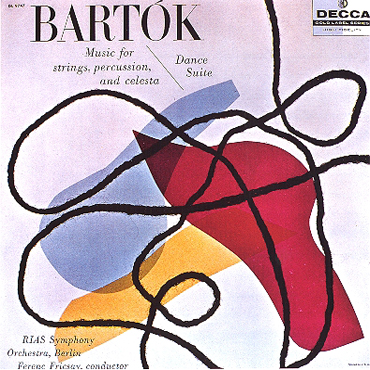
Out of the three topics this week, I chose to visit alexsteinweiss.com, and through my searches found a photo that reminded me of Wisely's 2007 album cover.
The picture below to the left is the art of Alex Steinweiss. The picture to the right is an '07 album cover for Wisely. This particular "Bartok" piece of Steinweiss's reminds me of the design on Wisely's album because of the bold shapes and colours, along with the scribbling effect throughout the image. The black lines are defient and make for an interesting effect on the pieces. Although the picture to the right is more modern than the other, they both seem to contain similar aspects. The calm, subtle background colour, the bold coloured shapes, and the black lines through the piece. The "Wisley" piece, tends to go more into depth with the text of the word as it seems to follow the effect of the black lines. It looks handwritten therefore is driven into the line effects. When I saw this particular Steinweiss piece, it immediately made me think of this particular piece.


Image 1 found on Alex Steinweiss website http://alexsteinweiss.com/pages/images/022.jpg
Image 2 found on http://www.prweb.com/prfiles/2007/08/16/267338/WiselyCover500x500.jpg

WEEK 7: Personal Topic Choice

Decide for yourself what aspect of the digital media class you want to reflect on or explore further in your blog post for this week

This week our Digital Media Lecture was cancelled.

This week in our audio portion, we focused on Sound FX in movies. It was so very interesting to me to learn of all the aspects of audio for film. I was fasinated to see the video of Indiana Jones, and how they create the different sounds such as the waves and the steal toed boots on the boat surface. I was so glad to have one of these classes because I was astonished at all the time and effort that goes into the movies. I was never aware of it. I am really looking forward to next semester, and the years to come, when we can work with audio for film. I am excited to produce our own personal SFX in our lab, and get a feel for what the professionals due. I have always had a passion to pursue a career in television or film, but was never sure what aspect I would like to do. After having this class, post-production is definitely an interest that I am excited to learn more about.

In our Digital Media lab we continued working with the program Flash, working on motion. We worked on creating a bumble bee and having it fly around the screen. We also had to add in sound FX to make the bee "buzz." This was a good assignment, as I learned how to add in sounds to the animations, which will be beneficial in my animation.